
shortcuts/no-neck-pain.nvim
 github
 967
967
 2
2
 4
4
 28
28
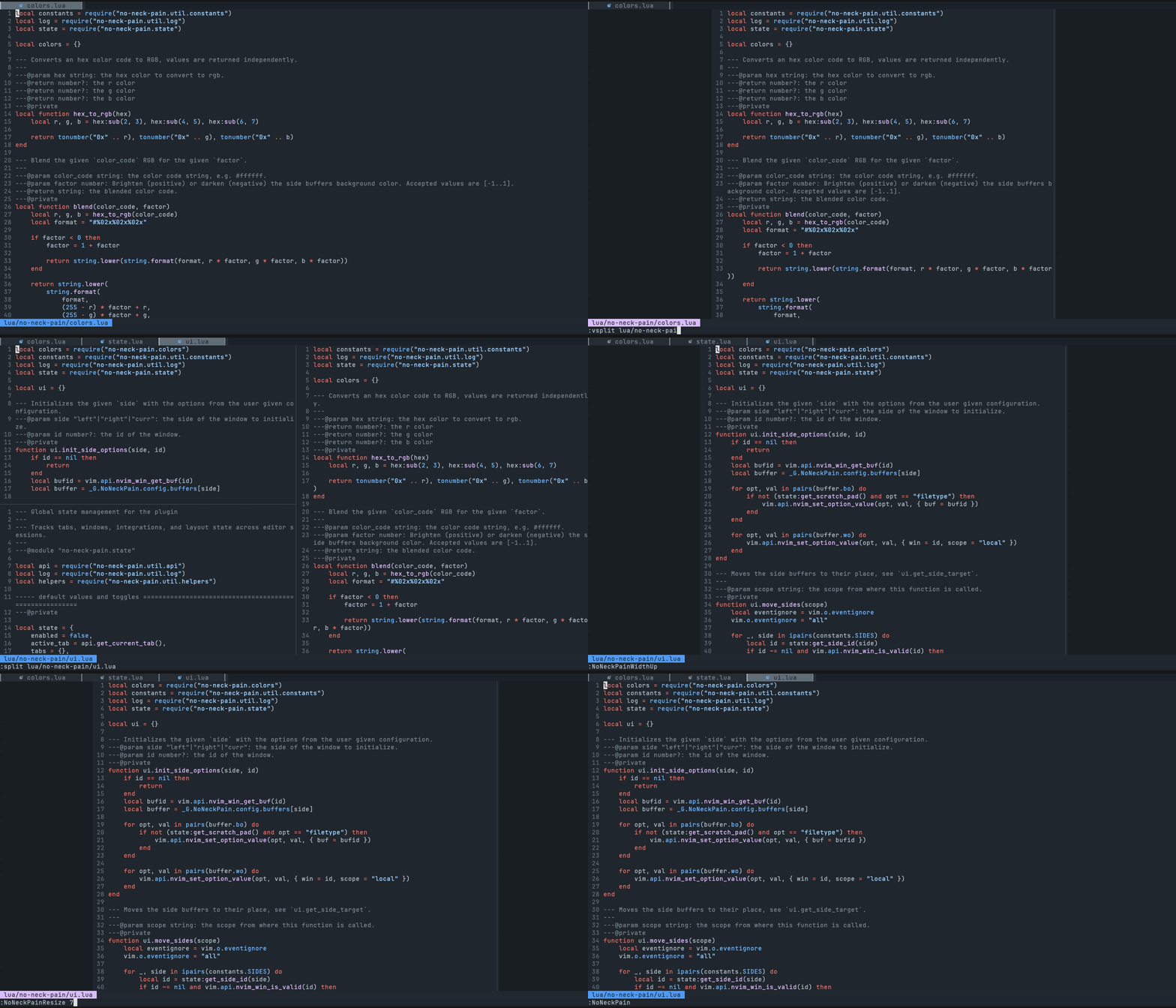
no-neck-pain.nvim opens an empty window on each side of the focused window, so your code sits in the middle of the screen at a fixed width. It does not change your splits, tabs, or keymaps, and it works with no configuration.
⚡️ Features
- Works without configuration: run
:NoNeckPain. - Keeps the layout centered across splits and vsplits, tabs, and terminal resizes.
- Side buffers can be colored or used as scratch pads that save to a file.
- Integrates with file trees (neo-tree, nvim-tree, snacks explorer), symbol panels (aerial, outline), neotest, nvim-dap-ui, and dashboards.
- Requires Neovim 0.10 or later. For Neovim 0.7 and 0.8, use the frozen 1.x branch. For 0.9, use the 2.x branch.
📋 Installation
Pin a release with the snippets below. Remove the version pin to follow main.
{ "shortcuts/no-neck-pain.nvim", version = "*" }
use({ "shortcuts/no-neck-pain.nvim", tag = "*" })
Plug 'shortcuts/no-neck-pain.nvim', { 'tag': '*' }
plugins.no-neck-pain.enable = true;
☄ Getting started
Run :NoNeckPain to center the current window. Run it again to go back to your normal layout.
To change the defaults, call setup() once in your config. This example sets the centered width to 120 columns, enables the default keymaps (<Leader>np toggles the plugin), and turns the plugin on when Neovim starts:
require("no-neck-pain").setup({
    width = 120,
    mappings = { enabled = true },
    autocmds = { enableOnVimEnter = true },
})
⚙ Configuration
Every option is optional. The Showcase has a screenshot for the common ones. Inside Neovim, :h NoNeckPain.options lists the plugin options and :h NoNeckPain.bufferOptions lists the side buffer options.
require("no-neck-pain").setup({
    -- Prints useful logs about triggered events, and reasons actions are executed.
    ---@type boolean
    debug = false,
    -- The width of the focused window that will be centered. When the terminal width is less than the `width` option, the side buffers won't be created.
    ---@type integer|"textwidth"|"colorcolumn"
    width = 100,
    -- Represents the lowest width value a side buffer should be.
    -- This option can be useful when switching window size frequently, example:
    -- in full screen screen, width is 210, you define an NNP `width` of 100, which creates each side buffer with a width of 50. If you resize your terminal to the half of the screen, each side buffer would be of width 5 and thereforce might not be useful and/or add "noise" to your workflow.
    ---@type integer
    minSideBufferWidth = 10,
    -- Disables the plugin if the last valid buffer in the list have been closed.
    ---@type boolean
    disableOnLastBuffer = false,
    -- When `true`, disabling the plugin closes every other windows except the initially focused one.
    ---@usage: this parameter will be renamed `killAllWindowsOnDisable` in a future release.
    ---@type boolean
    killAllBuffersOnDisable = false,
    -- When `true`, deleting the main no-neck-pain buffer with `:bd`, `:bdelete` does not disable the plugin, it fallbacks on the newly focused window and refreshes the state by re-creating side-windows if necessary.
    ---@type boolean
    fallbackOnBufferDelete = true,
    -- Adds autocmd (@see `:h autocmd`) which aims at automatically enabling the plugin.
    ---@type table
    autocmds = {
        -- When `true`, enables the plugin when you start Neovim.
        -- If the main window is  a side tree (e.g. NvimTree) or a dashboard, the command is delayed until it finds a valid window.
        -- The command is cleaned once it has successfuly ran once.
        -- When `safe`, debounces the plugin before enabling it.
        -- This is recommended if you:
        --  - use a dashboard plugin, or something that also triggers when Neovim is entered.
        --  - usually leverage commands such as `nvim +line file` which are executed after Neovim has been entered.
        ---@type boolean | "safe"
        enableOnVimEnter = false,
        -- When `true`, enables the plugin when you enter a new Tab.
        -- note: it does not trigger if you come back to an existing tab, to prevent unwanted interfer with user's decisions.
        ---@type boolean
        enableOnTabEnter = false,
        -- When `true`, reloads the plugin configuration after a colorscheme change.
        ---@type boolean
        reloadOnColorSchemeChange = true,
        -- When `true`, entering one of no-neck-pain side buffer will automatically skip it and go to the next available buffer. This setting is omitted when scratch pad is enabled.
        ---@type boolean
        skipEnteringNoNeckPainBuffer = true,
    },
    -- Creates mappings for you to easily interact with the exposed commands.
    ---@type table
    mappings = {
        -- When `true`, creates all the mappings that are not set to `false`.
        ---@type boolean
        enabled = false,
        -- Sets a global mapping to Neovim, which allows you to toggle the plugin.
        -- When `false`, the mapping is not created.
        ---@type string
        toggle = "<Leader>np",
        -- Sets a global mapping to Neovim, which allows you to toggle the left side buffer.
        -- When `false`, the mapping is not created.
        ---@type string
        toggleLeftSide = "<Leader>nql",
        -- Sets a global mapping to Neovim, which allows you to toggle the right side buffer.
        -- When `false`, the mapping is not created.
        ---@type string
        toggleRightSide = "<Leader>nqr",
        -- Sets a global mapping to Neovim, which allows you to increase the width (+5) of the main window.
        -- When `false`, the mapping is not created.
        ---@type string | { mapping: string, value: number }
        widthUp = "<Leader>n=",
        -- Sets a global mapping to Neovim, which allows you to decrease the width (-5) of the main window.
        -- When `false`, the mapping is not created.
        ---@type string | { mapping: string, value: number }
        widthDown = "<Leader>n-",
        -- Sets a global mapping to Neovim, which allows you to toggle the scratchPad feature.
        -- When `false`, the mapping is not created.
        ---@type string
        scratchPad = "<Leader>ns",
        -- Sets a global mapping to Neovim, which allows you to toggle the debug mode.
        -- When `false`, the mapping is not created.
        ---@type string
        debug = "<Leader>nd",
    },
    --- Common options that are set to both side buffers.
    --- See |NoNeckPain.bufferOptions| for option scoped to the `left` and/or `right` buffer.
    ---@type table
    buffers = {
        -- When `true`, the side buffers will be named `no-neck-pain-left` and `no-neck-pain-right` respectively.
        ---@type boolean
        setNames = false,
        -- Leverages the side buffers as notepads, which work like any Neovim buffer and automatically saves its content at the given `location`.
        -- note: quitting an unsaved scratchPad buffer is non-blocking, and the content is still saved.
        --- see |NoNeckPain.bufferOptionsScratchPad|
        scratchPad = {
            -- When `true`, automatically sets the following options to the side buffers:
            -- - `autowriteall`
            -- - `autoread`.
            ---@type boolean
            enabled = false,
            -- The name of the generated file. See `location` for more information.
            -- /!\ deprecated /!\ use `pathToFile` instead.
            ---@type string
            ---@example: `no-neck-pain-left.norg`
            ---@deprecated: use `pathToFile` instead.
            fileName = "no-neck-pain",
            -- By default, files are saved at the same location as the current Neovim session.
            -- note: filetype is defaulted to `norg` (https://github.com/nvim-neorg/neorg), but can be changed in `buffers.bo.filetype` or |NoNeckPain.bufferOptions| for option scoped to the `left` and/or `right` buffer.
            -- /!\ deprecated /!\ use `pathToFile` instead.
            ---@type string?
            ---@example: `no-neck-pain-left.norg`
            ---@deprecated: use `pathToFile` instead.
            location = nil,
            -- The path to the file to save the scratchPad content to and load it in the buffer.
            ---@type string?
            ---@example: `~/notes.norg`
            pathToFile = "",
        },
        -- colors to apply to both side buffers, for buffer scopped options @see |NoNeckPain.bufferOptions|
        --- see |NoNeckPain.bufferOptionsColors|
        colors = {
            -- Hexadecimal color code to override the current background color of the buffer. (e.g. #24273A)
            -- Transparent backgrounds are supported by default.
            -- popular theme are supported by their name:
            -- - catppuccin-frappe
            -- - catppuccin-frappe-dark
            -- - catppuccin-latte
            -- - catppuccin-latte-dark
            -- - catppuccin-macchiato
            -- - catppuccin-macchiato-dark
            -- - catppuccin-mocha
            -- - catppuccin-mocha-dark
            -- - github-nvim-theme-dark
            -- - github-nvim-theme-dimmed
            -- - github-nvim-theme-light
            -- - rose-pine
            -- - rose-pine-dawn
            -- - rose-pine-moon
            -- - tokyonight-day
            -- - tokyonight-moon
            -- - tokyonight-night
            -- - tokyonight-storm
            ---@type string?
            background = nil,
            -- Brighten (positive) or darken (negative) the side buffers background color. Accepted values are [-1..1].
            -- Only works when background is provided as well.
            ---@type integer
            blend = 0,
            -- Hexadecimal color code to override the current text color of the buffer. (e.g. #7480c2)
            ---@type string?
            text = nil,
        },
        -- Vim buffer-scoped options: any `vim.bo` options is accepted here.
        ---@see NoNeckPain.bufferOptionsBo `:h NoNeckPain.bufferOptionsBo`
        bo = {
            ---@type string
            filetype = "no-neck-pain",
            ---@type string
            buftype = "nofile",
            ---@type string
            bufhidden = "hide",
            ---@type boolean
            buflisted = false,
            ---@type boolean
            swapfile = false,
        },
        -- Vim window-scoped options: any `vim.wo` options is accepted here.
        ---@see NoNeckPain.bufferOptionsWo `:h NoNeckPain.bufferOptionsWo`
        wo = {
            ---@type boolean
            cursorline = false,
            ---@type boolean
            cursorcolumn = false,
            ---@type string
            colorcolumn = "0",
            ---@type boolean
            number = false,
            ---@type boolean
            relativenumber = false,
            ---@type boolean
            foldenable = false,
            ---@type boolean
            list = false,
            ---@type boolean
            wrap = true,
            ---@type boolean
            linebreak = true,
        },
        --- Options applied to the `left` buffer, options defined here overrides the `buffers` ones.
        ---@see NoNeckPain.bufferOptions `:h NoNeckPain.bufferOptions`
        left = NoNeckPain.bufferOptions,
        --- Options applied to the `right` buffer, options defined here overrides the `buffers` ones.
        ---@see NoNeckPain.bufferOptions `:h NoNeckPain.bufferOptions`
        right = NoNeckPain.bufferOptions,
    },
    -- Supported integrations that might clash with `no-neck-pain.nvim`'s behavior.
    --
    -- The key of each integration must be the filetype of the integration window.
    --
    -- The `position` is the side buffer that shrinks while the integration window is open. The main window is
    -- centered in the space left by the integration, not on the full screen. For example, with 200 columns,
    -- `width = 100` and a 40 columns tree on the left, each side buffer gets (200 - 40 - 100) / 2 = 30 columns.
    --
    ---@type table
    integrations = {
        -- @link https://github.com/nvim-tree/nvim-tree.lua
        ---@type table
        NvimTree = {
            -- The position of the tree.
            ---@type "left"|"right"
            position = "left",
        },
        -- @link https://github.com/nvim-neo-tree/neo-tree.nvim
        ["neo-tree"] = {
            -- The position of the tree.
            ---@type "left"|"right"
            position = "left",
        },
        -- @link https://github.com/mbbill/undotree
        undotree = {
            -- The position of the tree.
            ---@type "left"|"right"
            position = "left",
        },
        -- @link https://github.com/nvim-neotest/neotest
        neotest = {
            -- The position of the test panel.
            ---@type "right"
            position = "right",
        },
        -- @link https://github.com/rcarriga/nvim-dap-ui
        dap = {
            -- The position of the debug panel.
            ---@type "none"
            position = "none",
        },
        -- @link https://github.com/hedyhli/outline.nvim
        outline = {
            -- The position of the outline panel.
            ---@type "left"|"right"
            position = "right",
        },
        -- @link https://github.com/stevearc/aerial.nvim
        aerial = {
            -- The position of the symbols panel.
            ---@type "left"|"right"
            position = "right",
        },
        -- @link https://github.com/stevearc/oil.nvim
        oil = {
            -- The position of the file manager.
            ---@type "none"
            position = "none",
        },
        -- @link https://github.com/folke/snacks.nvim
        snacks_picker = {
            -- The position of the picker explorer.
            ---@type "left"|"right"
            position = "left",
        },
        -- this is a generic field to hint no-neck-pain that you use a dashboard plugin.
        -- the filetypes of natively supported dashboards are listed below in the `filetypes` field.
        -- if a dashboard that you use isn't supported, either set `dashboard.filetype` to the expected file type, or open a pull-request with the edited list.
        dashboard = {
            -- When `true`, debounce will be applied to the init method, leaving time for the dashboard to open.
            enabled = false,
            -- if a dashboard that you use isn't supported, you can use this field to set a matching filetype.
            ---@type string[]|nil
            filetypes = { "dashboard", "alpha", "starter", "snacks" },
        },
    },
    --- Allows you to provide custom code to run before (pre) and after (post) no-neck-pain steps (e.g. enabling).
    --- See |NoNeckPain.callbacks|
    ---@type table
    callbacks = {
        -- Runs right before centering the buffer
        ---@type fun(state: { enabled: boolean, active_tab: number, tabs: number[], disabled_tabs: number[], previously_focused_win: number })|nil
        preEnable = nil,
        -- Runs right after the buffer is centered
        ---@type fun(state: { enabled: boolean, active_tab: number, tabs: number[], disabled_tabs: number[], previously_focused_win: number })|nil
        postEnable = nil,
        -- Runs right before toggling NoNeckPain off
        ---@type fun(state: { enabled: boolean, active_tab: number, tabs: number[], disabled_tabs: number[], previously_focused_win: number })|nil
        preDisable = nil,
        -- Runs right after NoNeckPain has been turned off
        ---@type fun(state: { enabled: boolean, active_tab: number, tabs: number[], disabled_tabs: number[], previously_focused_win: number })|nil
        postDisable = nil,
    },
})

--- NoNeckPain's buffer `vim.wo` options.
---@see window options `:h vim.wo`
---
---@type table
--- Default values:
---@eval return MiniDoc.afterlines_to_code(MiniDoc.current.eval_section)
NoNeckPain.bufferOptionsWo = {
    ---@type boolean
    cursorline = false,
    ---@type boolean
    cursorcolumn = false,
    ---@type string
    colorcolumn = "0",
    ---@type boolean
    number = false,
    ---@type boolean
    relativenumber = false,
    ---@type boolean
    foldenable = false,
    ---@type boolean
    list = false,
    ---@type boolean
    wrap = true,
    ---@type boolean
    linebreak = true,
}

--- NoNeckPain's buffer `vim.bo` options.
---@see buffer options `:h vim.bo`
---
---@type table
--- Default values:
---@eval return MiniDoc.afterlines_to_code(MiniDoc.current.eval_section)
NoNeckPain.bufferOptionsBo = {
    ---@type string
    filetype = "no-neck-pain",
    ---@type string
    buftype = "nofile",
    ---@type string
    bufhidden = "hide",
    ---@type boolean
    buflisted = false,
    ---@type boolean
    swapfile = false,
}

--- NoNeckPain's scratchPad buffer options.
---
--- Leverages the side buffers as notepads, which work like any Neovim buffer and automatically saves its content at the given `location`.
--- note: quitting an unsaved scratchPad buffer is non-blocking, and the content is still saved.
---
---@type table
--- Default values:
---@eval return MiniDoc.afterlines_to_code(MiniDoc.current.eval_section)
NoNeckPain.bufferOptionsScratchPad = {
    -- When `true`, automatically sets the following options to the side buffers:
    -- - `autowriteall`
    -- - `autoread`.
    ---@type boolean
    enabled = false,
    -- The name of the generated file. See `location` for more information.
    -- /!\ deprecated /!\ use `pathToFile` instead.
    ---@type string
    ---@example: `no-neck-pain-left.norg`
    ---@deprecated: use `pathToFile` instead.
    fileName = "no-neck-pain",
    -- By default, files are saved at the same location as the current Neovim session.
    -- note: filetype is defaulted to `norg` (https://github.com/nvim-neorg/neorg), but can be changed in `buffers.bo.filetype` or |NoNeckPain.bufferOptions| for option scoped to the `left` and/or `right` buffer.
    -- /!\ deprecated /!\ use `pathToFile` instead.
    ---@type string?
    ---@example: `no-neck-pain-left.norg`
    ---@deprecated: use `pathToFile` instead.
    location = nil,
    -- The path to the file to save the scratchPad content to and load it in the buffer.
    ---@type string?
    ---@example: `~/notes.norg`
    pathToFile = "",
}

--- NoNeckPain's buffer color options.
---
---@type table
--- Default values:
---@eval return MiniDoc.afterlines_to_code(MiniDoc.current.eval_section)
NoNeckPain.bufferOptionsColors = {
    -- Hexadecimal color code to override the current background color of the buffer. (e.g. #24273A)
    -- Transparent backgrounds are supported by default.
    -- popular theme are supported by their name:
    -- - catppuccin-frappe
    -- - catppuccin-frappe-dark
    -- - catppuccin-latte
    -- - catppuccin-latte-dark
    -- - catppuccin-macchiato
    -- - catppuccin-macchiato-dark
    -- - catppuccin-mocha
    -- - catppuccin-mocha-dark
    -- - github-nvim-theme-dark
    -- - github-nvim-theme-dimmed
    -- - github-nvim-theme-light
    -- - rose-pine
    -- - rose-pine-dawn
    -- - rose-pine-moon
    -- - tokyonight-day
    -- - tokyonight-moon
    -- - tokyonight-night
    -- - tokyonight-storm
    ---@type string?
    background = nil,
    -- Brighten (positive) or darken (negative) the side buffers background color. Accepted values are [-1..1].
    -- Only works when background is provided as well.
    ---@type integer
    blend = 0,
    -- Hexadecimal color code to override the current text color of the buffer. (e.g. #7480c2)
    ---@type string?
    text = nil,
}

--- NoNeckPain's buffer side buffer option.
---
---@type table
--- Default values:
---@eval return MiniDoc.afterlines_to_code(MiniDoc.current.eval_section)
NoNeckPain.bufferOptions = {
    -- When `false`, the buffer won't be created.
    ---@type boolean
    enabled = true,
    ---@see NoNeckPain.bufferOptionsColors `:h NoNeckPain.bufferOptionsColors`
    colors = NoNeckPain.bufferOptionsColors,
    ---@see NoNeckPain.bufferOptionsBo `:h NoNeckPain.bufferOptionsBo`
    bo = NoNeckPain.bufferOptionsBo,
    ---@see NoNeckPain.bufferOptionsWo `:h NoNeckPain.bufferOptionsWo`
    wo = NoNeckPain.bufferOptionsWo,
    ---@see NoNeckPain.bufferOptionsScratchPad `:h NoNeckPain.bufferOptionsScratchPad`
    scratchPad = NoNeckPain.bufferOptionsScratchPad,
}
🧰 Commands
| Command | Description |
|---|---|
:NoNeckPain |
Toggles the plugin on and off. |
:NoNeckPainResize INT |
Sets width to INT and resizes the windows. |
:NoNeckPainToggleLeftSide |
Opens or closes the left side buffer. |
:NoNeckPainToggleRightSide |
Opens or closes the right side buffer. |
:NoNeckPainWidthUp |
Increases width by 5 and resizes the windows. |
:NoNeckPainWidthDown |
Decreases width by 5 and resizes the windows. |
:NoNeckPainScratchPad |
Toggles the scratch pad in the side buffers. |
:NoNeckPainDebug |
Toggles debug logs. |
🏗 Breaking changes
Each major release lists its breaking changes in its pull request:
⌨ Contributing
Pull requests and issues are welcome. Add as much context as you can, such as your config, Neovim version, and the plugins that open windows.
Before you open a pull request, run:
make deps           # clones the test dependencies into deps/
make lint
make test
make documentation  # regenerates doc/no-neck-pain.txt
To run the tests on every supported Neovim version, install versions with bob. make test-nightly runs the suite on nightly.
🎭 Motivations
Other zen and centering plugins exist. Most of them change your layout, hide UI elements, or need configuration before they fit your workflow. no-neck-pain.nvim only adds padding windows and leaves everything else as it was.